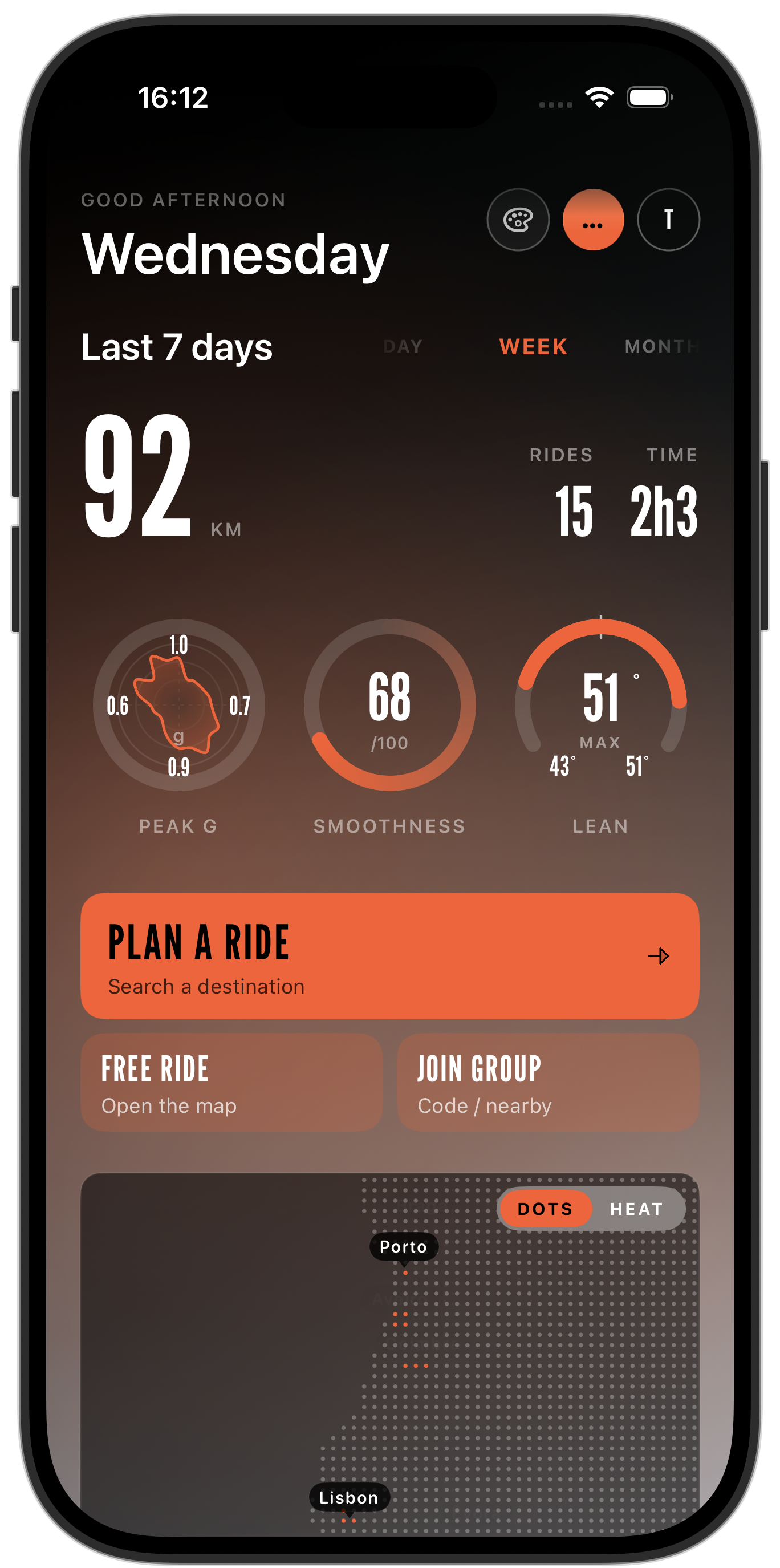
A precision cockpit for route planning, shared route discovery, live navigation, ride dynamics, group rides, and the roads worth coming back to.

Download for iPhone
Route
Curvy mode
Distance
58.4
miles planned
Next turn
1.2
mi · right
Group
4
riders live

YOUR RIDE HAS MORE SIGNAL THAN A MAP CAN SHOW.

Carvo dashboard showing weekly ride distance, ride dynamics, route planning, group ride actions, and a dotted map

PLAN IT. RIDE IT. REMEMBER IT.

A rider-first system of route planning, live cockpit signal, shared roads, group coordination, and post-ride dynamics.

Plan routes built for motorcycles

Multi-stop, round-trip, fast, curvy, scenic, or practical — pick the ride profile before the engine is warm.

9:41
Create route
CurvyScenicFastLoop
Start
Porto · 9:30
Stop 1
Serra overlook · 42 mi
Finish
Round trip · 118 mi

Discover roads riders repeat

Browse nearby shared routes, ratings, map previews, and road styles that feel more useful than pins on a map.

Serra Flow
Flowing · 42 mi
★ 4.8
Near you
16 rider-rated routes

Ride with live road signal

Weather, speed limits, cameras, traffic incidents, and rider-reported hazards stay glanceable in the cockpit.

9:41
62
mph
Right onto Skyline · 1.2 mi
Hazard ahead
Gravel reported · 0.4 mi
!

Remember how the ride felt

Every route becomes a recap: lean, G-force, elevation, pace, heart rate, favorites, export, and sharing.

9:41
Skyline loop
58.4 mi · 1h 47m · +1,920 ft
42°
lean
1.18g
peak
86
smooth
Save this as a favorite route, export GPX, or share it with nearby riders.
Ride recap
Dynamics synced
123

Not just where you went. How you rode.

Carvo captures the dynamics that make every ride feel different: lean angle, acceleration, G-force, smoothness, elevation, speed, and heart rate. After the ride, see where the road flowed and which moments shaped it.

Ride dashboard
58.4 mi
Skyline loop · 1h 47m
Avg speed
46mph
Max lean
42°
Top speed
78mph
Lean angle
42°
Max in turn 8
G-force
1.18g
Lateral peak
Smoothness
86
Out of 100
Elevation
+1,920ft
Total climb
Heart rate
138 bpm
Apex avg

Every ride becomes part of your story.

Record your rides, revisit the route, review your stats, and build a history of the roads you have ridden. Each ride can become a useful recap, a favorite route, or a road worth sharing.

  • Free ride recording without navigation
  • Automatic recording during navigation
  • Ride history with search and time filters
  • Completed-ride recaps with map trace and stats
  • Favorite routes from ride history or recap
  • GPX export
  • Optional route sharing
Skyline loop
58.4 mi · 1h 47m
Sat
Coast run
112.0 mi · 3h 12m
Wed
Mountain pass
74.8 mi · 2h 04m
Sun
Sunset roll
28.1 mi · 0h 51m
Fri

Find roads riders already love.

Save a completed ride as a favorite route, choose whether to share it, and explore nearby roads from other riders. Carvo classifies routes by feel, so discovery is about the ride — not just the destination.

  • Favorite routes from completed rides
  • Optional sharing with nearby riders
  • Nearby shared route browser
  • Filters for top rated, curvy, flowing, punchy, quick, and long routes
  • Route detail pages with map previews and stats
  • 1–5 star community route ratings
  • Navigation handoff from shared routes
Nearby
Top rated
Curvy
Flowing
Long
Serra flow
Flowing · 42 mi
4.8
Coast punch
Punchy · 31 mi
4.6
Long ridge
Long · 118 mi
4.9
Field notes
Nº 04 — on the difference between arriving and riding.

A good ridedoesn’t start witha destination. Itstarts with a roadworth the detour.

The road changes fast. Your cockpit should keep up.

Carvo keeps key riding context visible without turning the app into a distraction: speed, route progress, weather, traffic, cameras, and rider-reported hazards.

  • Live speed and route HUD
  • Weather awareness and route weather sampling
  • Speed limit display
  • Traffic incident awareness
  • Fixed speed camera overlay
  • Community hazard and radar reporting
  • Clear cockpit-first interface
Weather
68° · Light wind
Hazard
Gravel · 0.4 mi
62
mph
Fixed camera ahead · 1.2 mi
Skyline · NB

Ride together. Stay together.

Create or join a group ride, discover nearby opt-in groups, see buddies on the map, set a meeting point, and send quick ride requests without turning the ride into a group chat.

  • Group ride invite codes
  • Nearby opt-in group discovery
  • Buddy locations on the map
  • Shared meeting points and per-rider routes
  • Presence banners for joins and leaves
  • Quick requests: stop, fuel, break, regroup, hazard
  • Background notifications for quick actions
J
M
A
You
Group
Sunday Riders · 4 nearby
Carvo Premium
Carvo Premium

UNLOCK THE GOOD ROADS.

Premium turns Carvo from a ride recorder into a motorcycle copilot — better routes, live rider alerts, and the deeper metrics behind how every ride actually felt.

  • Better roads
    Curvy and scenic routing tuned for how a motorcycle wants to move — not the fastest line for a car.
  • Rider alerts
    Live community reports for police, hazards, cameras, and road conditions on the way ahead.
  • Advanced ride insights
    Lean angle, ride rhythm, dynamics maps, and the full metrics deep dive after every ride.
  • Community riding
    Shared routes, rider favourites, and group ride tools built for how riders actually meet up.
Start riding with Premium
Cancel anytime · Yearly saves 40%

Common questions.

Can I follow turn-by-turn through a helmet Bluetooth or intercom?+

Yes. Carvo routes voice prompts through whatever audio device the phone is paired with — helmet comms, intercoms, single-ear buds — and the prompt cadence is tuned for wind noise rather than car cabins.

Does Carvo work offline once the ride starts?+

Yes. Preview the route before you leave and Carvo caches the map tiles, the turn list, and the route feel data for the whole ride. If you drop signal in a canyon or a pass, navigation and recording keep going; hazards and buddy positions sync back the moment you reconnect.

How does Carvo handle a group ride when riders take different lines?+

Group members share an invite code and see each other on the map. If someone drifts off the shared route — for fuel, for a scenic detour, to peel off — Carvo tracks them independently instead of forcing a rejoin, and the quick requests (regroup, fuel, break, hazard) work whether the group is together or spread across a pass.

Is the interface glove-friendly and readable in direct sun?+

The cockpit layout uses large hit targets, high-contrast type, and a landscape-first HUD sized for a bar-mounted phone. Common actions are one or two taps and reachable with winter gloves; the on-ride view is designed to be glanceable, not read.

What phone mount and power setup do you recommend?+

Any rigid bar or stem mount with vibration damping works — Peak Design, Quad Lock, SP Connect are all fine. For rides over a couple of hours we recommend USB power from the bike so recording, GPS, and screen brightness do not drain the battery before the good roads.

What do you actually record — and what stays on the device?+

Every ride captures route, distance, elevation, speed profile, lean angle, G-force, and smoothness, plus heart rate if a watch is paired. Rides stay on the device by default; cloud sync, sharing, and community hazard visibility are opt-in through Premium.

Is Carvo safe to use while riding?+

Carvo is designed to be glanceable and to fall back to voice when the road demands attention — but you are still riding. Follow local laws, ride within your limits, and only interact with the app when it is safe and legal to do so.

Plan better routes, understand how you rode, and keep every mile in one motorcycle-first cockpit.

Download for iPhone
